The Road to Readiness: How a Small Contractor Closes CMMC Gaps Without a Compliance Department

What is true, and what is not yet true
Here is what is true. A small defense contractor — a machine shop, a fabricator, an electronics assembler, a software subcontractor with a dozen employees — can meet CMMC Level 2. The requirements are the 110 controls of NIST SP 800-171 Revision 2, and they are the same requirements the contractor's contracts have already imposed for years through DFARS clause 252.204-7012. Small businesses have done this, including the small businesses that make up roughly 80 percent of authorized or accredited C3PAOs, according to the Cyber AB's August 2026 response to the Department's reform request for information. None of that makes the work small. For a company without a compliance department, without a dedicated security engineer, and without a large IT budget, readiness is a project measured in months, not weeks, and it competes for the same hours as production, quoting, and delivery.
Here is what is not yet true. There is no shortcut product that makes a company compliant by itself — no single software purchase, no single template pack, no single agent hire. There is also no fixed deadline you can safely plan around today: the transition to Phase 2, which would have made third-party C3PAO certification a condition of award for most CUI contracts on November 10, 2026, was suspended on July 13, 2026, pending a 60-day program review, and the Department has not announced a date for resuming it. Phase 1 self-assessment requirements remain in effect, and DFARS 252.204-7012 remains in force. And one more statement that belongs at the top: the CMMC agent described in this article is a readiness advisor, not a certifier. It cannot grant, guarantee, or substitute for CMMC certification or a C3PAO assessment, and as of November 6, 2026 its instance is offline — no instance is deployed and no hire can be fulfilled today.
This article is a practical road map for the owner or operations lead of a small contractor who has to get this done with the staff they already have. It assumes Level 2, because that is where the hard work lives, and it notes where Level 1 differs. It is general education, not legal or assessment advice. Your contract says which level applies to you.
1. Start with the question most companies skip: what do we actually handle?
Every readiness project that fails starts the same way: with a purchase, or a gap assessment, before anyone has established what information the company handles and where it lives. The first step costs nothing but attention, and it determines the size of everything after it.
List every Department of Defense contract and subcontract you hold or are pursuing, and for each one record whether it involves Federal Contract Information, Controlled Unclassified Information, or neither. The answer is in the contract language and in the markings on the information you receive — CUI markings in document headers and footers, with a designation indicator naming the controlling organization, the category, and dissemination controls. If a drawing, a specification, or a data package arrived marked CUI, you handle CUI. If a prime sent you a flow-down letter naming a CMMC level, keep it with the contract; it is the most direct statement of what is expected of you. If you genuinely cannot tell whether something is CUI, ask the prime or the contracting officer in writing. Guessing wrong in either direction costs money: treating FCI as CUI buys work you do not owe, and treating CUI as FCI leaves you exposed.
Then map where that information lives. Walk the floor, literally. Which workstations open CUI drawings? Which server or cloud folder stores them? Which email accounts receive them? Which printers print them, which USB drives carry them to the shop floor, which personal phones photograph them? A small company can usually draw this map on a single page, and that page becomes the most valuable document in the project — because the map defines the boundary of what must be protected, and the boundary defines the cost. A contractor that lets CUI wander across its whole network assesses its whole network. A contractor that confines CUI to a defined set of systems assesses those systems.
This is the scoping decision, and it is the single highest-leverage decision in the project. The formal version of it is the System Security Plan (SSP), the document required by NIST SP 800-171 that describes the system boundary, the environment, and how each requirement is met. But before the SSP there is a simpler artifact: a one-page diagram showing the systems that touch CUI, the people who use them, and the connections between them. Draw it, date it, and keep it. Everything else in this article hangs off it.
2. Score yourself honestly before you spend anything
Once the boundary is drawn, the next step is a baseline self-assessment against the 110 requirements of NIST SP 800-171 Revision 2, scored the way the Department scores it: start at 110 and subtract weighted points — 1, 3, or 5 — for each requirement not met. The 14 families and their counts are: Access Control (22), Awareness and Training (3), Audit and Accountability (9), Configuration Management (9), Identification and Authentication (11), Incident Response (3), Maintenance (6), Media Protection (9), Personnel Security (2), Physical Protection (6), Risk Assessment (3), Security Assessment (4), System and Communications Protection (16), and System and Information Integrity (7).
Be honest in a way that is uncomfortable. A requirement is met only when it is implemented and you can show evidence — a configuration, a log, a record, a signed policy that is actually followed. "We have antivirus" is not evidence for the system-and-information-integrity requirements; a current console report showing coverage, update status, and alert handling is. "Everyone knows not to share passwords" is not evidence for identification and authentication; multifactor authentication enforced on every privileged and network account is. The assessor's standard is the assessment objectives in NIST SP 800-171A — roughly 320 of them across the 110 requirements — and each objective must be satisfied for the requirement to be met. A readiness check that scores a requirement as met on the basis of an intention has not measured anything.
Most small contractors land somewhere in the middle on a first baseline: the basics of access control and physical protection are often partly in place, while the documented and evidenced disciplines — audit log review, configuration baselines, incident response testing, media handling records — are usually thin or absent. That pattern is normal, and it is useful: it tells you that the gap is not only technical, it is also operational. The work ahead is not only buying tools; it is writing down how the tools are used, who is responsible, and how you prove it.
Record the baseline in a Plan of Action and Milestones — a POA&M — with one row per unmet requirement, an owner, a due date, and the evidence that will close it. The POA&M is not an admission of failure; it is the working document of the project, and at Level 2 it is also a formal artifact with rules attached. For conditional Level 2 status the score must be at least 88 out of 110, and POA&M items generally cannot include requirements carrying 3- or 5-point values, subject to a narrow exception. That rule shapes the order of work: the high-weight items come first, because they cannot be deferred. At Level 1, no POA&M is permitted at all — all 15 requirements must be met.
3. Shrink the problem before you solve it
The most cost-effective move in the whole project is usually not a purchase. It is segmentation: making the boundary smaller. Every system, user, and connection inside the CUI boundary is in scope for all 110 requirements. Every system outside it is not — provided the boundary is real, documented, and enforced, with controlled data flows and no informal workarounds.
Practical steps a small shop can take: move CUI to a dedicated file share or a dedicated cloud tenant rather than the general company drive; give CUI users dedicated workstations or a virtual desktop rather than letting CUI sit on every machine in the building; route remote access through a single managed access point with multifactor authentication; stop emailing CUI drawings to personal accounts; collect the shop-floor USB drives and replace them with a controlled transfer process. None of these steps is exotic. All of them reduce the number of systems an assessor must examine, the number of people who must be trained and screened, and the number of configurations that must be kept current.
There is a temptation to solve scoping with a vendor product — a "compliant enclave" sold as a turnkey answer. Some of those products are genuinely useful, and a hosted enclave can be the right choice for a company with no IT staff at all. But an enclave is not compliance by itself. The contractor remains responsible for the requirements inside the enclave, for the people who use it, for the data that enters and leaves it, and for the evidence. Before signing for any enclave or managed service, ask for the shared-responsibility description in writing: which of the 110 requirements the provider meets, which the customer meets, and what evidence the provider supplies. If the vendor cannot answer in those terms, the product is not ready for your assessment, however polished the sales material.
The same discipline applies to cloud services. Under DFARS 252.204-7012, an external cloud service provider that stores, processes, or transmits Covered Defense Information must meet the FedRAMP Moderate baseline or its equivalent, and the contractor holds the evidence proving it. That means the choice of cloud storage, email, or backup service is a compliance decision, not only an IT preference — and a consumer-grade file-sharing account is not a defensible home for CUI. Check the provider's FedRAMP status and keep the record; it is one of the easiest evidence items to produce and one of the most commonly missing.
4. The five-point items first: a prioritized order of work
With a baseline and a POA&M in hand, the order of work matters more than the total effort. The scoring weights give you the order for free: fix the 5-point items first, then the 3-point items, then the 1-point items. The high-weight requirements are also, in most cases, the ones that protect you most. Here is the sequence that works for most small contractors, in the order a sensible owner would tackle it.
Identity first: multifactor authentication everywhere. Requirement 3.5.3 of NIST SP 800-171 requires multifactor authentication for local and network access to privileged accounts and for network access to non-privileged accounts. Every remote user needs it, not only administrators. This is a 5-point requirement, it is one of the most frequently failed, and it is also the cheapest high-impact control in the program: authenticator apps and hardware keys are inexpensive, and enforcement is a configuration setting in your identity platform. Do this first, before anything else, and enforce it without exceptions — including for the owner. Exceptions are findings.
Then encryption, done properly. Two requirements dominate here: employ FIPS-validated cryptography when cryptography is used to protect the confidentiality of CUI (3.13.11), and employ cryptographic mechanisms to protect the confidentiality of remote access sessions (3.1.13). "FIPS-validated" is a specific term: it means the cryptographic module has been validated under the federal program, not merely that the product claims to use strong encryption. Check the module validation for your VPN, your disk encryption, and your file-sharing service, and keep the record. This is also one of the most frequently failed requirements, and it is the reason a cheap consumer VPN or an unvalidated encryption tool can sink an otherwise solid posture. If your current tools are not FIPS-validated for the job, replace them before the assessment, not during it.
Then access control and the basics of the boundary. Limit system access to authorized users and to the transactions and functions they are permitted to execute (3.1.1, 3.1.2). In practice that means: named accounts for every person, no shared logins, least privilege by role, separation of duties where it matters, session lock and termination after inactivity, and remote access routed through managed access control points with no split tunneling — the practice of letting a remote device reach outside resources while connected to your network, which requirement 3.13.7 prohibits. Most of this is configuration and discipline, not purchase. The cost is the afternoon spent removing the shared "shop" login and the old accounts of people who left two years ago.
Then logging and monitoring — and actually reading the logs. Requirements 3.3.1 and 3.3.2 require creating and retaining audit records and ensuring actions can be traced to individual users. The failure mode here is not the absence of logs; modern systems generate them by default. The failure is that nobody reviews them, nobody retains them for the required period, and nobody can tie an event to a person because accounts are shared. Assign the review to a named person, on a named schedule, and keep a record of the reviews. An assessor will ask who reviews the logs and how often, and "the system does it" is not an answer.
Then the documented disciplines: configuration, maintenance, media, and incident response. Establish configuration baselines for your systems and keep them current (configuration management, 9 requirements). Control maintenance — including remote maintenance sessions and the tools used (maintenance, 6 requirements). Control media: sanitize or destroy media containing CUI before disposal or reuse, and control portable storage (media protection, 9 requirements). And build an incident response capability: a written plan, named roles, and a tested process (incident response, 3 requirements). The incident response plan matters beyond the assessment, because DFARS 252.204-7012 requires reporting a cyber incident affecting Covered Defense Information to the Department within 72 hours of discovery, preserving media images for at least 90 days, and submitting isolated malicious software to the DoD Cyber Crime Center. A company that discovers an incident on a Friday and spends the weekend deciding who to call has already lost the clock. Write the plan, test it with a tabletop exercise, and keep the record of the test.
Then the people requirements, which cost the least and are skipped the most. Awareness and training (3 requirements) means everyone who touches CUI is trained on the risks and the procedures, with records. Personnel security (2 requirements) means screening individuals before they access CUI and having transfer and termination procedures that actually remove access when someone leaves. Physical protection (6 requirements) means controlling physical access to the systems and the media — locked rooms, visitor control, and device control on the shop floor. These are the requirements a small company can meet with a sign-in sheet, a checklist, and a lock, and they are the requirements most often left undone because nobody owned them. Assign an owner to each one.
Finally, the risk and security assessment families. Risk assessment (3 requirements) means conducting risk assessments periodically and remediating what they find. Security assessment (4 requirements) means monitoring your security controls on an ongoing basis and keeping the System Security Plan current. These are the families that turn a one-time project into a continuing operation — which is the point of the annual affirmation. A contractor that treats readiness as a project with an end date will be unready again within a year. A contractor that treats it as an operating rhythm — monthly log review, quarterly access review, annual risk assessment and affirmation — will not.
5. Evidence is the product
Here is the sentence that reframes the whole project: the assessor does not assess your intentions, your purchases, or your policies. The assessor assesses evidence. Every requirement in scope must be shown to be met, through interviews, examination of artifacts, and testing. A policy that nobody follows is not evidence. A tool that is installed but not configured is not evidence. A control that was working in March and broke in June, with no record of either state, is not evidence.
So build the evidence as you go, not at the end. For each requirement in the POA&M, record what the evidence will be: a screenshot of the configuration, a report from the console, a signed training roster, a log review record, a test result. Store it in one place — a folder per requirement, or a simple evidence register — and keep it current. The System Security Plan is the document that ties it together: it describes the system boundary, the environment, and how each of the 110 requirements is implemented. It is the document the assessor reads first, and it is the document a readiness assessment checks first. Write it in plain language, keep it accurate, and update it when the environment changes. An SSP that describes last year's network is worse than no SSP, because it misleads the people who rely on it.
There is a practical test for whether your evidence is ready: hand the evidence folder to someone who was not involved in building it — a colleague, an advisor, a readiness agent — and ask them to find the proof for five requirements chosen at random. If they cannot find it in ten minutes, the assessor will not find it either. That test is cheap, it is humbling, and it is the closest thing to a rehearsal you can get without paying for one.
6. Who does the work when there is no compliance department
A small contractor does not need a compliance department. It needs three roles, and they can all be part-time, held by people who already work there.
The first role is the owner — the person accountable for the program. In a small company that is usually the business owner or the operations lead, and the job is to set the boundary, approve the POA&M, and sign the affirmation. The affirmation is signed by a senior official, and that signature should not be delegated to someone who has not seen the evidence. The owner's time commitment is real but bounded: a few hours a month once the program is running, more during the build.
The second role is the technical lead — the person who configures the systems, enforces multifactor authentication, manages the logs, and keeps the configurations current. In many small companies this is the IT contractor, the managed service provider, or the most technical employee. Whoever it is, the arrangement must be explicit: a written statement of what the provider is responsible for, mapped to the requirements, and what evidence the provider supplies. A managed service provider that cannot map its services to the 110 requirements is not a CMMC-ready provider, and a company that assumes its IT vendor "handles security" without that mapping is the most common failure pattern in the program.
The third role is the coordinator — the person who keeps the POA&M, the SSP, the training records, and the evidence folder current. This is administrative work, not technical work, and it is the role most often left vacant. It does not need a security background. It needs persistence and a calendar. In a company of twelve people, this is a few hours a week. Without it, the technical work decays: training lapses, logs go unread, the SSP goes stale, and the next baseline is worse than the last.
Around those three roles sits the outside help, used deliberately. A Registered Practitioner Organization or a Registered Practitioner can advise and implement; they cannot assess. A readiness agent — including the CMMC agent described below — can look up controls, produce gap reports and policy templates, and watch for requirement changes; it cannot certify you. Use outside help for what it is good at: an independent baseline, a template for the SSP, a review of the evidence folder, a tabletop exercise for incident response. Do not use it as a substitute for the three internal roles. An advisor can build your evidence folder, but only your people can keep it current, and an assessor can tell the difference.
A word on cost, stated honestly. This article does not quote a price for readiness, because there is no honest single number: the cost depends on the scope, the starting posture, and whether the work is done internally or bought. What can be said honestly is that the cheapest costs are the disciplined ones — scoping tightly, fixing the 5-point items first, and building evidence as you go — and the most expensive costs are the undisciplined ones: buying tools before scoping, hiring an assessor before the baseline is clean, and rebuilding a program that was allowed to decay. The Department's own review, launched in July 2026, is examining burden and cost precisely because the current numbers are contested. Do not let anyone quote you a readiness price that depends on a deadline that no longer exists.
7. A realistic timeline
Readiness is not a sprint, and a plan that promises it in thirty days is a plan that has not counted the requirements. The timeline below is illustrative — a sequence, not a deadline — for a small contractor starting from a typical baseline. Adjust it to your starting score and your production calendar, and do not schedule the heavy work during your busiest delivery period.
| Phase | Work | Typical duration |
|---|---|---|
| 1. Discover | List contracts and information; draw the boundary map; name the three roles | 2–3 weeks |
| 2. Baseline | Self-assess against all 110 requirements; score honestly; build the POA&M | 2–4 weeks |
| 3. Shrink | Segment CUI; fix cloud and remote-access choices; remove stale accounts | 2–4 weeks |
| 4. Fix the 5-point items | Multifactor authentication; FIPS-validated encryption; access control | 4–8 weeks |
| 5. Document | System Security Plan; incident response plan; policies for the areas in scope | 3–6 weeks, overlapping phase 4 |
| 6. Evidence | Build the evidence folder; run the ten-minute test; tabletop the incident plan | 2–3 weeks |
| 7. Rehearse | Independent readiness review; close what it finds; re-score | 2–4 weeks |
| 8. Operate | Monthly log and access reviews; quarterly POA&M review; annual risk assessment and affirmation | Ongoing |
Two things about that table deserve emphasis. First, phases overlap: documentation should start while the technical fixes are under way, not after them, because writing the SSP forces decisions about the boundary and the controls. Second, the timeline is governed by your contracts, not by the program's phase-in schedule. The July 2026 suspension moved the third-party assessment gate; it did not move your DFARS 252.204-7012 obligations, your primes' flow-down expectations, or the next solicitation you want to bid. Plan to the contracts you hold and the bids you want to win.
8. What the CMMC agent can — and cannot — do on this road
The CMMC Compliance Advisor is one of five agents operated by the AGI Future Foundation on Virtuals Protocol. It is a readiness advisor, and on the road described in this article its jobs map to specific phases. The catalog, as recorded on November 6, 2026, is six jobs and one subscription, all with Require Funds on: control_lookup at $2 per 30 minutes — one control, what it requires, and the evidence needed, useful when you are working through the baseline requirement by requirement; compliance_data_access at $10 per 24 hours — structured CMMC reference data, control lists and requirement mappings as JSON or CSV; policy_template at $15 per 24 hours — a policy template for the area you name; readiness_check at $25 per 24 hours — a readiness check for the level you name, covering controls in scope, current posture, and gaps; compliance_gap_report at $50 per 48 hours — a detailed gap report with each missing control, the evidence needed, and remediation steps; and full_readiness_assessment at $150 per 72 hours — a full readiness assessment of all controls in scope, with posture, gaps, and remediation steps. The subscription is compliance_watch at $20 per 30 days: ongoing watch on CMMC requirement changes and what they mean for your posture. Those are the only prices that apply to this agent.
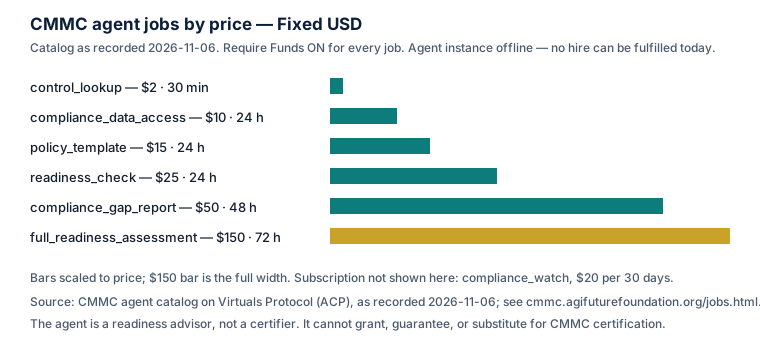
The agent's standing as of the same date: Pro status, no token, Health 2 out of 5, Compute $9.75 in credits, 0 jobs completed, $0 earned. And the fact that governs everything else: as of November 6, 2026, the CMMC agent's instance is offline. No instance is deployed, and no hire can be fulfilled today. Hosting must be settled and an instance deployed before a hired job can be delivered. Do not plan a phase of your readiness project around hiring the agent until that status changes, and do not treat the catalog as a promise of current availability.
Its limits are the same as in the companion article, and they bear repeating here because they shape how you use it. It is a readiness advisor, not a certifier. It cannot grant, guarantee, or substitute for CMMC certification or a C3PAO assessment. It cannot sign documents, transfer funds, commit code, or represent your organization. It cannot sign your annual affirmation. What it can do, when online, is the preparatory work at a fixed, low price: the $2 control lookup while you baseline, the $50 gap report to structure the POA&M, the $15 policy template for the area you are documenting, the $150 full assessment as a rehearsal before you pay for a real one. Used that way, it is a cheap way to find out what you do not know. Used as a substitute for the assessment, it is a misunderstanding.
9. Frequently asked questions
We have no IT staff. Can we still do this? Yes, with a tight scope and outside help for the technical work — but the three internal roles (owner, technical lead, coordinator) still need named people, even if the technical lead is your managed service provider under a written, requirement-mapped agreement.
Should we wait until Phase 2 resumes? No. Your DFARS 252.204-7012 obligations, your primes' flow-down requirements, and your next bid are all in force now. The pause changed the timing of the external check, not the work.
What is the most common reason small contractors fail a first assessment? On the evidence in the public record, the pattern is consistent: the controls exist in some form, but the evidence does not — no log review records, no configuration baselines, no training rosters, an SSP that describes a different network. Build the evidence as you go.
Do we need a dedicated CUI enclave? Not necessarily. You need a defined, enforced boundary. An enclave is one way to get it; disciplined segmentation of your existing network is another. Choose on the basis of your size and your IT capacity, and get the shared-responsibility mapping in writing either way.
Can the CMMC agent do our readiness assessment for us? It can produce a readiness assessment as a hired job — the full_readiness_assessment at $150 per 72 hours — when it is online. That is a readiness report, not a certification, and it does not substitute for a C3PAO assessment. As of November 6, 2026 the agent is offline and no hire can be fulfilled.
Glossary
- C3PAO — CMMC Third-Party Assessor Organization, accredited by the Cyber AB to conduct Level 2 certification assessments.
- FIPS-validated cryptography — cryptographic modules validated under the federal Cryptographic Module Validation Program; required where cryptography protects the confidentiality of CUI.
- POA&M — Plan of Action and Milestones: a documented plan for remediating unmet requirements, with owners and due dates.
- SPRS — Supplier Performance Risk System, where assessment results and affirmations are posted.
- SSP — System Security Plan: the document describing the system boundary, environment, and how each requirement is implemented.
References
- InterSec, "CMMC 2.0 Requirements: The 3 Levels for Contractors," https://www.intersecinc.com/guides/federal-contractors-guide-to-cmmc-2-0 — levels, phase-in timeline, the July 13, 2026 Phase 2 suspension, flow-down.
- Schellman, "What is NIST SP 800-171?," updated February 6, 2026, https://www.schellman.com/blog/federal-compliance/what-is-nist-sp-800-171 — the 110 requirements in 14 families and their counts.
- Industrial Cyber, "CMMC Phase II halt puts C3PAO assessments on hold but leaves NIST SP 800-171 obligations in force for contractors," August 25, 2026, https://industrialcyber.co/features/cmmc-phase-ii-halt-puts-c3pao-assessments-on-hold-but-leaves-nist-sp-800-171-obligations-in-force-for-contractors/ — the suspension, the 60-day review, and the continuation of DFARS 252.204-7012 obligations.
- The Cyber AB, "The Cyber AB's Response to the DoW's 'Reforming CMMC and Reducing Compliance Burden (RFI)'," August 14, 2026, https://CYBERAB.ORG/News-Events/Press-Releases/the-cyber-abs-response-to-the-dows-reforming-cmmc-and-reducing-compliance-burden-rfi — the accreditation body's role and its account of C3PAO composition.
- Essendis, "DFARS 252.204-7012 Incident Reporting & NIST SP 800-171," https://www.essendis.com/post/dfars-7012-incident-reporting-how-vulnerability-management-supports-compliance — the 72-hour reporting duty, malware submission, and 90-day preservation.
- Complyology, "DFARS 252.204-7012 incident reporting: the 72-hour clock and what starts it," https://www.complyology.io/blog/dfars-7012-incident-reporting.html — incident reporting, media preservation, and the relationship between DFARS 7012 and the CMMC clauses.
- RiskWatch, "NIST 800-171: Protecting CUI, Explained (2026)," https://www.riskwatch.com/nist-800-171/ — the 110 requirements, the SPRS scoring method, and Revision 2 versus Revision 3.
- CMMC Compliance Advisor, Virtuals Protocol ACP page, https://app.virtuals.io/acp/agents/019ebb4d-70a7-7e23-9c28-41175e14c566 — job catalog and prices as recorded November 6, 2026.
- CMMC agent site, https://cmmc.agifuturefoundation.org/ and jobs page https://cmmc.agifuturefoundation.org/jobs.html — catalog, status, and offline notice as of November 6, 2026.
- AGI Future Foundation, https://www.agifuturefoundation.org/ — the Foundation that operates the CMMC agent.
This article is general education about a public program. It is not legal or assessment advice, or a promise about any agent's availability. Confirm your required CMMC level against your solicitation, your contract, and current Department of Defense publications, and check the agent's live ACP page before attempting a hire.